# Defining Relational Tokens (Registration & Dossier Management)

<a href="/en/gr/71498/">Registration & Dossier Management</a>
 allows you to create Relational Token <a class="external-link " href="https://developer.veevavault.com/mdl/#vault-components" target="_blank" rel="noopener">components<i class="fa fa-external-link" aria-hidden="true"></i></a> for use in certain object records and MDL components to automate certain functions by leveraging hierarchical object relationships. When users run a [supported action][9], Vault generates and populates records based on how the token resolves to the related records of the object defined by the token. If you link a Relational Token to an <a href="/en/gr/74401/"> Object Mapping</a>
, Vault also populates mapped fields with the same values in the source object records based on token resolution.

You can also use <a class="external-link " href="https://developer.veevavault.com/mdl/#mdl-overview" target="_blank" rel="noopener">MDL<i class="fa fa-external-link" aria-hidden="true"></i></a> to create Relational Tokens. See <a href="/en/gr/494967/">About RegulatoryOne Component Types</a>
 for more details.

## About Relational Tokens {#about}

Tokens are pieces of text with a specific [format][1] that Vault replaces with the values the token represents. Similar to predefined <a href="/en/gr/6382/">tokens</a>
 that resolve to a value, Relational Tokens allow you to leverage relationships between objects, giving you greater control over the configurability of the hierarchical object relationship values you want to reference. Relational Tokens point to a specified field on a specified object. Relational Tokens also allow you to have parent-child token relationships so that you can represent values throughout a product's hierarchy.

### Recursive Relational Tokens {#recursive}

You can create recursive Relational Tokens, meaning Vault continues to apply the Relational Token to all generated records created as the token resolves through the hierarchy for the specified object until Vault can create no more additional records. For example, you can create a recursive Relational Token that generates <a href="/en/gr/71505/">_Requirements_</a>
 for all raw materials in a product hierarchy, including raw materials composed of other raw materials that are indirectly related to _Formulations_ in the product hierarchy via _Formulation Compositions_. You can also specify if you want Vault to apply any VQL Criteria on the Relational Token at record creation or post-recursive record creation.

### Supported Actions {#actions}

The following actions support Relational Tokens and generate or populate records based on token resolution:

* <a href="/en/gr/76906/#generate-registration-data">**Generate Registration Data**</a>
: Populates mapped fields on _Registration Items_ with values from existing _Registration Items_ for Local Impact Assessments. You must link the Relational Token to an [Object Mapping][2] to specify which mapped fields Vault populates.
* <a href="/en/gr/71505/#generate-action">**Generate Requirements**</a>
: Generates _Requirements_ with _EDLs_ and _EDL Items_ based on hierarchical product relationships. If you link the Relational Token to an [Object Mapping][2], Vault populates mapped fields on the new records. This action supports up to 30 Relational Tokens in the _Requirement_ parent-child structure.
* <a href="/en/gr/71505/#update-action">**Update Requirements**</a>
: Generates _Requirements_ with _EDLs_ and _EDL Items_ based on hierarchical product relationships. If you link the Relational Token to an [Object Mapping][2], Vault populates mapped fields on the new records. This action supports up to 30 Relational Tokens in the _Requirement_ parent-child structure.
* <a href="/en/gr/75233/#split-action">**Split Registration Item**</a>
: Creates and relates _Registration Items_ from a source _Registration Item_. If you link the Relational Token to an [Object Mapping][2], Vault populates mapped fields on the new records.

<div class="note-border alert-info">
  <div class="alert alert-info" role="alert">
    <div><i class="far fa-info-circle"></i></div>
    <div class="alert-text">
      <p><strong>Note</strong>: If you link any of these actions to Relational Tokens that create cycles with the specified parent token, the action will fail.</p>
    </div>
  </div>
</div>


### Format {#format}

The format of Relational Tokens in RegulatoryOne differs from  <a class="external-link " href="https://developer.veevavault.com/sdk/#vault-tokens" target="_blank" rel="noopener">Vault information tokens<i class="fa fa-external-link" aria-hidden="true"></i></a> and <a href="/en/gr/6382/">tokens</a>
 used elsewhere in Vault, such as in messages, document numbers, and system-managed object record names. Depending on how you use a Relational Token, you will either reference the token's label in curly brackets (such as "{product}") or the token's _Name_ (such as `product__c`).

Registration & Dossier Management does not include any standard `__v` or system `__sys` namespace Relational Tokens; you can define Relational Tokens that best suit your organization's needs. Relational Tokens that you create are custom tokens and always have the `__c` custom namespace suffix. 

### Example {#example}

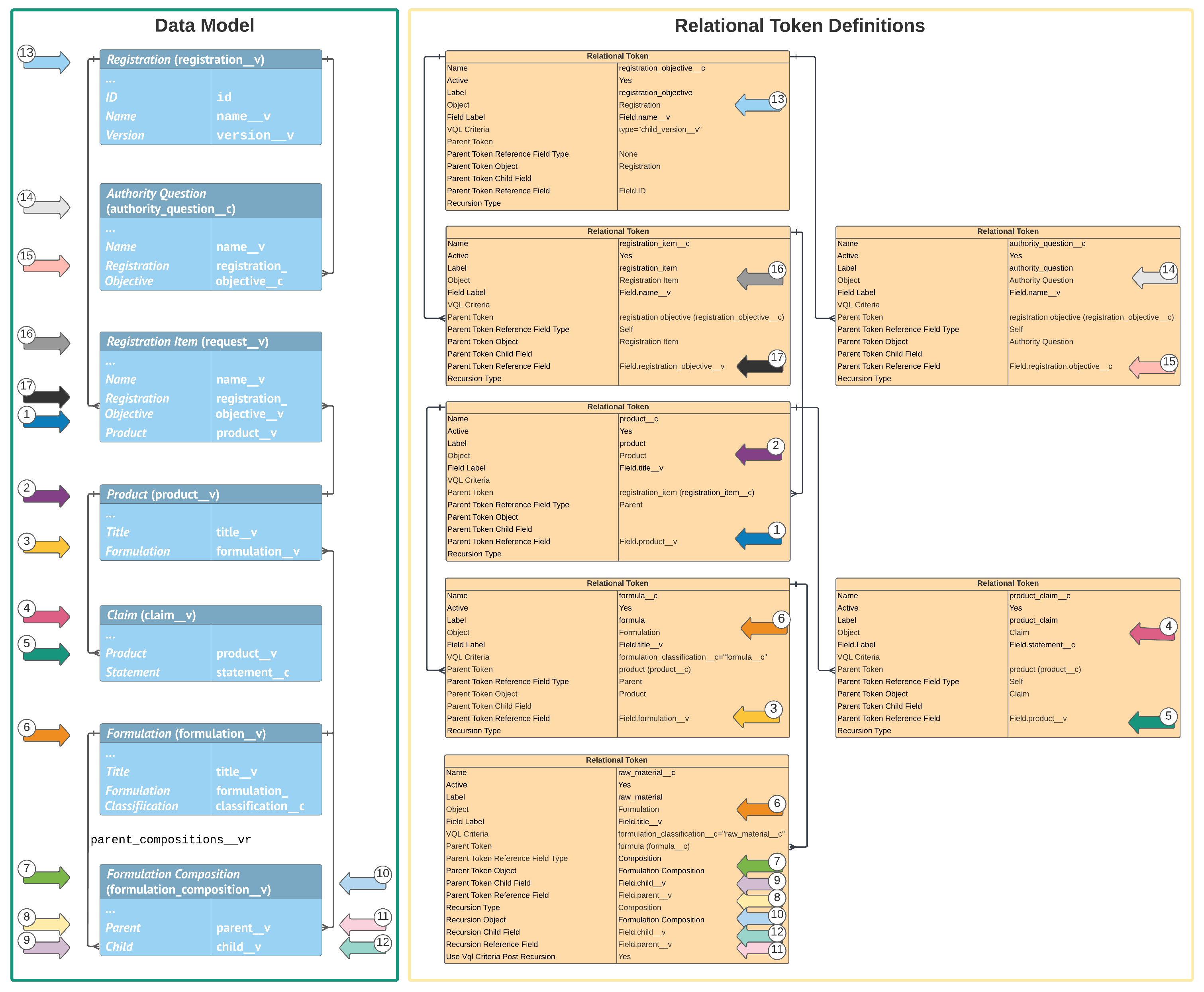
Review the following illustration for an example of how you could leverage the product hierarchy data model in your Relational Token definitions.

<a href="https://platform.veevavault.help/assets/images/cpc-rdm-token-definitions.png" data-lightbox="cpc-rdm-token-definitions.png" data-title="" data-alt="Relational Token Example">
  <img class="docimage" src="https://platform.veevavault.help/assets/images/cpc-rdm-token-definitions.png" alt="Relational Token Example" style=""  />
</a>

## Configuration Overview

Configuring your Vault to use Relational Tokens involves the following steps:

1. Optional: Create [Object Mappings with Field Mappings][2] to define how Vault populates fields based on token resolution. To use a Relational Token to <a href="/en/gr/76906/#generate-registration-data">generate registration data for Local Impact Assessments</a>
, you must create an Object Mapping before creating the Relational Token.
2. [Create the applicable Relational Tokens][11].
3. After creating the applicable root Relational Tokens and before configuring any [supported actions][9], link the actions to [root tokens][5].
4. [Update relevant object records and MDL components to reference the applicable Relational Tokens][10].

## Defining Object Mappings & Field Mappings {#object-mappings}

Before creating a Relational Token, ensure you have already created any optional Object Mapping components you want to link to the Relational Token so that Vault populates the mapped fields with the same value in the source object records that resolve based on the Relational Token. To use a Relational Token to <a href="/en/gr/76906/#generate-registration-data">generate registration data for Local Impact Assessments</a>
, you must link it to a predefined Object Mapping by populating the _Request Object Mapping_ field.

After you create an Object Mapping with Field Mappings, you can link it to Relational Tokens by populating the applicable fields on a Relational Token's _Details_ page:

* **Request Object Mapping**: When you select an Object Mapping in this field, Vault populates fields on _Registration Items_ when users run the _Generate Registration Data_ and _Split Registration Items_ actions. The selected Object Mapping's _Target Object_ must be _Registration Item_. You must  select an Object Mapping in this field to populate _Registrations_ when users run the _Generate Registration Data_ action.
* **Request Requirement Object Mapping**: When you select an Object Mapping in this field, Vault populates fields on _Requirements_ when users run the _Generate Requirements_ and _Update Requirements_ actions. The selected Object Mapping's _Target Object_ must be _Requirement_.
* **EDL Object Mapping**: When you select an Object Mapping in this field, Vault populates fields on _EDLs_ when users run the _Generate Requirements_ and _Update Requirements_ actions. The selected Object Mapping's _Target Object_ must be _EDL_.
* **EDL Item Object Mapping**: When you select an Object Mapping in this field, Vault populates fields on _EDL Items_ when users run the _Generate Requirements_ and _Update Requirements_ and _Update Requirements_ actions. The selected Object Mapping's _Target Object_ must be _EDL Item_.

The _Source Object_ of any selected Object Mapping must match the token's _Object_. See <a href="/en/gr/74401/">Defining Object Mappings & Field Mappings</a>
 for more details.

## Creating Relational Tokens {#creating}

Before creating a Relational Token, ensure you have already created any [Object Mappings][2] you want to link to the token. To use a Relational Token to <a href="/en/gr/76906/#generate-registration-data">generate registration data for Local Impact Assessments</a>
, you must link it to a predefined Object Mapping.

All objects and fields referenced in the token must be active. When entering specific object field names, you must enter the values in "Field.[field_name__v]" format. For example, `Field.name__v`.

<div class="note-border alert-info">
  <div class="alert alert-info" role="alert">
    <div><i class="far fa-info-circle"></i></div>
    <div class="alert-text">
      <p><strong>Note</strong>: After creating the necessary Relational Tokens, you must <a href="#root-tokens">link each supported action to a root token</a>. If you do not do this, the action will fail when run by users. We suggest using the <a href="#recommended">recommended Relational Tokens</a> as root tokens.</p>
    </div>
  </div>
</div>


To create a Relational Token:

1. Navigate to **Admin > Configuration > Relational Token**.
2. On the _All Relational Tokens_ page, click **Create**.
3. Enter a unique **Name**. Vault automatically adds the `__c` suffix to the _Name_ you enter.
4. Specify if the token is **Active**. If you select **No**, Vault ignores the inactive token when supported actions run.
5. Enter a unique **Label**. This field does not support spaces.
6. Select the **Object** this token refers to.
7. Enter the **Field Label** for a field on this token's _Object_. When the _Generate Requirements_ and _Update Requirements_ actions run, this field is used as a label when the token resolves in a generated record. Vault ignores this field when the _Generate Registration Data_ and _Split Registration Items_ actions run.
8. Optional: Enter any **VQL Criteria** to apply on object records when the token is used, such as `formulation_classification__c="formula__c"`. This field does not support `IN` or `LIKE` operators.
9. Optional: Select a **Parent Token**.
10. Select the **Parent Token Reference Field Type** to determine how the _Parent Token_ is processed relative to this token:
  * **Self**: The _Parent Token Reference Field_ is on this token's _Object_.
  * **Parent**: The _Parent Token Reference Field_ is on the parent token's _Object_.
  * **Composition**: The _Parent Token Reference Field_ is on a separate join or composition object that has a relationship to this token's _Object_.
  * **None**: This token has no parent. Select this option if you did not select a _Parent Token_.
11. Select the **Parent Token Object**. If you selected _Self_ or _None_ as the _Parent Token Reference Field Type_, select this token's _Object_.
12. For _Composition_ types only: Enter the name of the **Parent Token Child Field** of the inbound relationship. This field must be on the _Parent Token Object_.
13. Enter a **Parent Token Reference Field** depending on the specified _Parent Token Reference Field Type_. If you selected _Self_ or _Parent_, enter a field on this token's _Object_. If you selected _Composition_, enter a field on the parent token's _Object_. If you selected _None_, enter `Field.ID`. 
14. Optional: Specify that this token is [recursive][6] by entering values for the following fields. If this token is not recursive, leave these fields blank:
  * **Recursion Type**: Select **Self** if the _Recursion Reference Field_ is on this token's _Object_. Select **Composition** if the _Recursion Reference Field_ is on a join or composition object related to this token's _Object_. Do not select _Self_Reference_.
  * **Recursion Object**: Select the inbound object. For _Composition_ recursion type, this specifies the object of this token's inbound relationship. For _Self_ recursion type, select this token's _Object_. 
  * **Recursion Reference Field**: Enter the name of the field on the _Recursion Object_ on which recursion is applied.
  * **Recursion Child Field**: If you selected _Composition_ for _Recursion Type_, enter the name of a field on the _Recursion Object_ to specify this token's inbound relationship. Otherwise, leave this field blank.
  * **Use VQL Criteria Post Recursion**: Select **Yes** or **No** to determine if Vault applies the _VQL Criteria_ of this token as new records are created or post-recursive record creation. If you did not define any _VQL Criteria_ for this token, select **No**.
15. To specify fields Vault populates when this token resolves, select one (1) or more predefined [Object Mappings][2] with the same _Source Object_ as this token's _Object_. You must select a **Request Object Mapping** if you plan to use this token to <a href="/en/gr/76906/#generate-registration-data">generate registration data</a>
. Otherwise, these fields are all optional:
  * **Request Object Mapping**: Select an Object Mapping with a _Target Object_ of _Registration Item_ to populate _Registration Items_ when the _Generate Registration Data_ and _Split Registration Items_ actions run.
  * **Request Requirement Object Mapping**: Select an Object Mapping with a _Target Object_ of _Requirement_ to populate _Requirements_ when the _Generate Requirements_ and _Update Requirements_ actions run.
  * **EDL Object Mapping**: Select an Object Mapping with a _Target Object_ of _EDL_ to populate _EDLs_ when the _Generate Requirements_ and _Update Requirements_ actions run.
  * **EDL Item Object Mapping**: Select an Object Mapping with a _Target Object_ of _EDL Item_ to populate _EDL Items_ when the _Generate Requirements_ and _Update Requirements_ actions run.
16. Click **Save**.

<div class="note-border alert-info">
  <div class="alert alert-info" role="alert">
    <div><i class="far fa-info-circle"></i></div>
    <div class="alert-text">
      <p><strong>Note</strong>: When creating recursive Relational Tokens, never select <em>Self_Reference</em> in the <em>Recursion Type</em> field.</p>
    </div>
  </div>
</div>


## Editing Relational Tokens {#editing}

To edit a Relational Token, navigate to the applicable Relational Token and select **Edit** from the **All Actions** menu. After you make the applicable changes, click **Save**. 

## Deleting Relational Tokens {#deleting}

To delete a Relational Token, navigate to the applicable Relational Token and select **Delete** from the **All Actions** menu. Then, click **Continue** to proceed with the deletion. 

## Linking Actions to Root Relational Tokens {#root-tokens}

After creating the applicable Relational Tokens and before configuring any of the supported actions, you must link each action to a root Relational Token using Relational Token Settings. If you do not do this, the actions will fail. We suggest using the [recommended components][15] to link supported actions to root tokens.

You must create Relational Token Settings for the following supported actions:

* <a href="/en/gr/76906/#generate-registration-data">**Generate Registration Data**</a>
 (`GENERATE_REGISTRATION_DATA`): The _Generate Registration Data_ action on the _Registration Item_ and _Event_ objects. The Root Token (such as `registration_item__c`) must reference the _Registration Item_ object.
* <a href="/en/gr/71505/#generate-action">**Generate Requirements for Registration Item**</a>
 (`GENERATE_REQUIREMENT`): The _Generate Requirements_ and _Update Requirements_ actions on the _Registration Item_ object. The Root Token (such as `registration_item__c`) must reference the _Registration Item_ object.
* <a href="/en/gr/71505/#generate-action">**Generate Requirements for Registration Objective**</a>
 (`GENERATE_REQUIREMENT_FOR_RO`): The _Generate Requirements_ and _Update Requirements_ actions on the _Registration_ and _Event_ objects. The Root Token (such as `registration_objective__c`) must reference the _Registration_ object.
* <a href="/en/gr/75233/#split-action">**Split Registration Item**</a>
 (`SPLIT_REGISTRATION`): The _Split Registration Item_ action on the _Registration Item_ object. The Root Token (such as `registration_item__c`) must reference the _Registration Item_ object.

Any objects referenced in Relational Tokens must be directly or indirectly related to the object defined by the root Relational Token for the supported action in order for the Relational Token to resolve when that action runs. For example, when the _Generate Requirements_ action runs on a _Registration Item_ record and a related _Requirement Library_ references the `packaging__c` Relational Token in the _Name_ field, the `packaging__c` Relational Token must be a direct or indirect child of the `registration_item__c` Relational Token.

### Defining Relational Token Settings {#token-settings}

To create a Relational Token Setting:

1. Navigate to **Admin > Configuration > Relational Token Setting**.
2. On the _All Relational Token Settings_ page, click **Create**.
3. Enter a unique **Name**. Vault automatically adds the `__c` suffix to the _Name_ you enter.
4. Enter a unique **Label**. This field does not support spaces.
5. Specify if the component is **Active**. If you select **No**, Vault ignores the inactive component when supported actions run.
6. Select a **Root Token**.
7. To link a generate requirements action (_Generate Requirements for Registration Item_ or _Generate Requirements for Registration Objective_), select an active _Requirement_ object type in the **Generate Requirements Action Target OT** field. The actions must reference different object types.
8. Select a supported **Action**.
9. Click **Save**.

### Recommended Components {#recommended}

We recommend using specific [Relational Tokens][16] and [Relational Token Settings][17] to link each action to a root Relational Token. You may need to create these components if they are not already in your Vault.

#### Recommended Relational Tokens {#recommended-tokens}

We recommend using the following Relational Token components (a parent and a child) to use as root tokens linked to supported actions, which you can also use for other purposes as needed. You may need to create these components if they are not already in your Vault:
 
<table>
    <tr>
        <th><strong>Attribute</strong></th>
        <th><strong>Parent Token</strong></th>
        <th><strong>Child Token</strong></th>
    </tr>
    <tr>
        <td>Name</td>
        <td><code>registration_objective__c</code></td>
        <td><code>registration_item__c</code></td>
    </tr>
    <tr>
        <td>Label</td>
        <td><em>registration_objective</em></td>
        <td><em>registration_item</em></td>
    </tr>
    <tr>
        <td>Object</td>
        <td><em>Registration</em></td>
        <td><em>Registration Item</em></td>
    </tr>
    <tr>
        <td>Field Label</td>
        <td><code>Field.name__v</code></td>
        <td><code>Field.name__v</code></td>
    </tr>
    <tr>
        <td>VQL Criteria</td>
        <td>null</td>
        <td>null</td>
    </tr>    
    <tr>
        <td>Parent Token</td>
        <td>null</td>
        <td><code>registration_objective__c</code></td>
    </tr>
    <tr>
        <td>Parent Token Reference Field Type</td>
        <td><em>None</em></td>
        <td><em>Self</em></td>
    </tr>    
    <tr>
        <td>Parent Token Object</td>
        <td><em>Registration</em></td>
        <td><em>Registration Item</em></td>
    </tr>
    <tr>
        <td>Parent Token Child Field</td>
        <td>null</td>
        <td>null</td>
    </tr>   
    <tr>
        <td>Parent Token Reference Field</td>
        <td><code>Field.id</code></td>
        <td><code>Field.registration__v</code></td>
    </tr>
    <tr>
        <td>Recursion Type</td>
        <td>null</td>
        <td>null</td>
    </tr>    
</table>

#### Recommended Relational Token Settings {#recommended-settings}

If you are using the [recommended Relational Tokens][16] (`registration_objective__c` and `registration_item__c`), we recommend also using the following Relational Token Setting components to link supported actions to root tokens, which you can also use for other purposes as needed. You may need to create these components if they are not already in your Vault:

<table>
    <tr>
        <th><strong>Attribute</strong></th>
        <th><strong>Generate Registration Data</strong></th>
        <th><strong>Generate Requirements for Registration Item</strong></th>
        <th><strong>Generate Requirements for Registration Objective</strong></th>
        <th><strong>Split Registration Item</strong></th>
    </tr>
    <tr>
        <td>Name</td>
        <td><code>generate_registration_data__c</code></td>
        <td><code>generate_requirement__c</code></td>
        <td><code>generate_requirement_for_ro__c</code></td>
        <td><code>split_registration__c</code></td>
    </tr>
    <tr>
        <td>Label</td>
        <td><code>generate_registration_data</code></td>
        <td><code>generate_requirement</code></td>
        <td><code>generate_requirement_for_ro</code></td>
        <td><code>split_registration</code></td>
    </tr>
    <tr>
        <td>Root Token</td>
        <td><code>registration_item__c</code></td>
        <td><code>registration_item__c</code></td>
        <td><code>registration_objective__c</code></td>
        <td><code>registration_item__c</code></td>
    </tr>
    <tr>
        <td>Associated Object Type RIR</td>
        <td>null</td>
        <td>The name of an active <em>Requirement</em> <a href="/en/gr/71505/#object-types">object type</a>
.</td>
        <td>The name of an active <em>Requirement</em> <a href="/en/gr/71505/#object-types">object type</a>
.</td>
        <td>null</td>
    </tr> 
    <tr>
        <td>Action</td>
        <td><code>GENERATE_REGISTRATION_DATA</code></td>
        <td><code>GENERATE_REQUIREMENT</code></td>
        <td><code>GENERATE_REQUIREMENT_FOR_RO</code></td>
        <td><code>SPLIT_REGISTRATION</code></td>
    </tr>
</table>

 <div class="note-border alert-important">
  <div class="alert alert-important" role="alert">
    <div><i class="far fa-exclamation-circle"></i></div>
    <div class="alert-text">
      <p><strong>Important</strong>: Relational Token Setting components for the <code class="language-plaintext highlighter-rouge">GENERATE_REQUIREMENT</code> and <code class="language-plaintext highlighter-rouge">GENERATE_REQUIREMENT_FOR_RO</code> actions must reference different <a href="/en/gr/71505/#object-types"><em>Requirement</em> object types</a>
 for the <em>Associated Object Type RIR</em> attributes. After you save a Relational Token Setting, you cannot modify the Associated Object Type RIR value.</p>
    </div>
  </div>
</div>


## Using Relational Tokens in Object Records & MDL Components {#update}

After creating a Relational Token, you can add it to certain object records and MDL components to use the token within a supported field. RegulatoryOne Registration & Dossier Management supports Relational Tokens in the following fields and attributes:

* [The _Token Label_ and _Name_ fields on _Requirement Library_ object records][12]
* [The _Relational Token_ field on _Split Rule_ object records][13]
* [The Relational Token attribute on Registration Attribute MDL components][14]

### Using Relational Tokens in Requirement Libraries to Generate Requirements {#requirements}

To update a _Requirement Library_ record to use a Relational Token to generate _Requirements_ using the _Generate Requirements_ and _Update Requirements_ actions:

1. Navigate to the appropriate _Requirement Library_ record.
2. Click **Edit**.
3. In the **Token Label** field, enter the appropriate token's _Label_, such as "product".
4. In the **Name** field, include the appropriate token's _Label_ by enclosing the token within curly brackets, such as "{product}". You can enter a combination of a token and text, such as using a token called "{product}" where the _Product_ record is "Lipstick" alongside the text "SDS" so that when the token resolves and Vault generates the new appropriate record, the name of the record would be "Lipstick SDS".
5. Click **Save**.

#### Limitations {#limitations}

The following limitations apply to using Relational Tokens to generate _Requirements_:

* Vault creates up to 100,000 _Requirement_ records and 35,000 total records as Relational Tokens resolve when users trigger record generation.
* Vault supports up to ten (10) levels for Relational Token hierarchies for _Requirement Libraries_.
* Vault supports a maximum of 100 root-level _Requirement Library_ records.

### Using Relational Tokens in Split Rules to Generate Registration Items {#split-rules}

You must reference a predefined token in the _Relational Token_ field when <a href="/en/gr/75233/#create">creating a new _Split Rule_ record</a>
, which determines how Vault splits a source _Registration Item_ into new and related _Registration Items_.

If you link a _Split Rule_ with an _Output Structure_ of _Hierarchy_ to a [recursive Relational Token][6], the _Split Registration Items_ action creates and relates new _Registration Items_ to mirror the same hierarchy of the records queried by the Relational Token. For example, if a gift set contains a travel kit and the travel kit includes a lotion, users can generate hierarchical _Registration Items_ for the gift set. In that scenario, the travel kit _Registration Item_ is a child of the gift set _Registration Item_, and the lotion _Registration Item_ is a child of the travel kit _Registration Item_.

### Using Relational Tokens in Registration Attributes to Map Registration Item Fields {#registration-attributes}

You can reference a predefined Relational Token linked to an Object Mapping in the Relational Token (`relational_token`) attribute on Registration Attribute (`Registrationattribute`) components to support the <a href="/en/gr/76906/#local-impact-assessment">_Local Impact Assessment_</a>
, <a href="/en/gr/76906/#generate-registration-data">_Generate Registration Data_</a>
, and <a href="/en/gr/512728/#gia-action">_Run Global Impact Assessment_</a>
 actions. See <a href="/en/gr/761426/">Defining Registration Attributes</a>
 for more details.

## About Job Status & Error Logging {#status}
When users run any of the jobs below, Vault includes details about token resolution in the related job log, as well as any errors that occurred during the job instance:

* _Generate Requirements for Registration Item_
* _Generate Requirements for Registration Objective_
* _Split Registration Item_

## Related Permissions

You can complete all the steps in this article with the standard _System Administrator_ or _Vault Owner_ security profile. If your Vault uses custom security profiles, your profile must grant the following <a href="/en/gr/22824/">permissions</a>
:

<table>
  <tr>
    <th><strong>Type</strong></th>
    <th><strong>Permission</strong></th>
    <th><strong>Controls</strong></th>
  </tr>
  <tr>
    <td>Security Profile</td>
    <td>Admin: Configuration: Configuration: All Configuration</td>
    <td>Ability to create and modify Relational Tokens.</td>
  </tr>
  <tr>
    <td>Security Profile</td>
    <td>Application: Vault Actions: API: Metadata API</td>
    <td>Ability to access the <em>All Relational Tokens</em> page from the <em>Application Configurations</em> section of the <em>Configurations</em> page.</td>
  </tr>
  <tr>
    <td>Security Profile</td>
    <td>Objects: All Objects: Object Permissions: Create, Edit</td>
    <td>Ability to create and modify Relational Tokens.</td>
  </tr>
  <tr>
    <td>Security Profile</td>
    <td>Pages: All Pages: Relational Token Details: View</td>
    <td>Ability to view the <em>Details</em> page for individual Relational Tokens.</td>
  </tr>
  <tr>
    <td>Security Profile</td>
    <td>Pages: All Pages: Relational Token List: View</td>
    <td>Ability to view the list of Relational Tokens on the <em>All Relational Tokens</em> page.</td>
  </tr>
</table>

 [1]: #format
 [2]: #object-mappings
 [3]: #requirements
 [4]: #split-rules
 [5]: #root-tokens
 [6]: #recursive
 [7]: #registration-attributes
 [8]: #status
 [9]: #actions
 [10]: #update
 [11]: #creating
 [12]: #requirements
 [13]: #split-rules
 [14]: #registration-attributes
 [15]: #recommended
 [16]: #recommended-tokens
 [17]: #recommended-settings
