 The _Claim_ object with local adaptations includes the following read-only fields:
* **Local Adaptation Count**: Displays the number of local adaptations created for the parent _Claim_ object record.
* **\# of Rejected Local Adaptations**: Displays a count of the number of local adaptations in the _Rejected_ state.
* **\# of Challenged Local Adaptations**: Displays a count of the number of local adaptations in the _Challenged_ state.
### How to Create Single Local Adaptations {#create-la}
To create a single _Local Adaptation_:
1. Navigate to the _Claim_ for which you want to create a local adaptation.
2. In the _Local Adaptation_ section, click **Create**.
3. Choose the **Country** for which you want to create the local adaptation.
4. Optional: Enter the **Footnote**.
5. Optional: Select the **Marketing Channels**.
6. Optional: Select the appropriate **Statement**. The values available for selection are the statements relating to the _Claim_ (including global and local _Statements_).
7. Click **Save**.
### How to Copy Local Adaptations {#copy-la}
You can create a new _Local Adaptation_ by [copying](/en/lr/32218/) an existing _Local Adaptation_ record. When configured by your Admin, you can also deep copy the related _Local Adaptation_ hierarchy when [copying a _Claim_](/en/lr/54337/#copy-claim).
### How to Bulk Create Multiple Local Adaptations {#bulk-la}
To create multiple _Local Adaptations_ in bulk:
1. Navigate to the _Claim_ for which you want to bulk create local adaptations.
2. From the **All Actions** menu, select **Bulk Create Local Adaptations**.
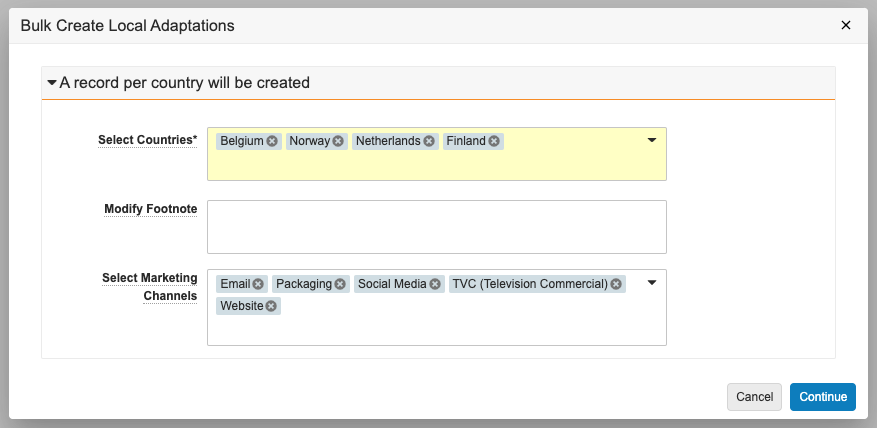
3. In the _Bulk Create Local Adaptations_ dialog, select the locations for which you want to create the local adaptation. For each location you select, Vault creates a unique corresponding _Local Adaptation_ record.
4. Optional: Review the selections in the **Select Marketing Channels** field and remove or add any, if needed.
5. Optional: Modify the footnote details. If you do not modify the footnote details, the local adaptation inherits the footnote from the selected parent _Claim_.
6. Click **Continue**. The local adaptation claims appear in the **Local Adaptations** section of the specified _Claim_ when created.
## Adding & Replying to Comments {#comments}
When configured by your Admin, you can add and reply to comments on _Local Adaptation_ records. See [Using Comments](/en/lr/520894/) for more details.
## Adding Substantiation Documents {#substantiation}
You can add _Substantiations_ to _Claims_ and _Local Adaptations_ to provide proof of validity and view all _Substantiations_, and their related _Claims_, supported by each substantiation document in your Vault. See [Substantiating Claims & Local Adaptations](/en/lr/492018/) for more details about creating _Substantiations_, associating each record to a relevant reference document, and adding them to _Claims_.
## Creating Local Adaptations from a Project
You can also create _Local Adaptations_ for multiple locations from a _Project_. See [Creating Local Adaptations from a Project](/en/lr/78535/) for more details.
## Populating Statement Translations for Local Adaptations
Depending on your Admin's configuration, you may be able to populate statement translations for local adaptations when the local adaptation is in a particular lifecycle state. The _Populate Statement Translations_ action uses Admin-configured country-language mappings to generate _Local Adaptation Statement Join_ records based on the global statement of each specified _Claim_.
### How to Populate Statement Translations
To populate statement translations for local adaptations:
1. Navigate to the appropriate _Local Adaptation_ record.
2. From the **All Actions** menu, select **Populate Statement Translations**.
When notified, navigate to the _Statements_ section to see the newly-created _Statements_ records.
The _Claim_ object with local adaptations includes the following read-only fields:
* **Local Adaptation Count**: Displays the number of local adaptations created for the parent _Claim_ object record.
* **\# of Rejected Local Adaptations**: Displays a count of the number of local adaptations in the _Rejected_ state.
* **\# of Challenged Local Adaptations**: Displays a count of the number of local adaptations in the _Challenged_ state.
### How to Create Single Local Adaptations {#create-la}
To create a single _Local Adaptation_:
1. Navigate to the _Claim_ for which you want to create a local adaptation.
2. In the _Local Adaptation_ section, click **Create**.
3. Choose the **Country** for which you want to create the local adaptation.
4. Optional: Enter the **Footnote**.
5. Optional: Select the **Marketing Channels**.
6. Optional: Select the appropriate **Statement**. The values available for selection are the statements relating to the _Claim_ (including global and local _Statements_).
7. Click **Save**.
### How to Copy Local Adaptations {#copy-la}
You can create a new _Local Adaptation_ by [copying](/en/lr/32218/) an existing _Local Adaptation_ record. When configured by your Admin, you can also deep copy the related _Local Adaptation_ hierarchy when [copying a _Claim_](/en/lr/54337/#copy-claim).
### How to Bulk Create Multiple Local Adaptations {#bulk-la}
To create multiple _Local Adaptations_ in bulk:
1. Navigate to the _Claim_ for which you want to bulk create local adaptations.
2. From the **All Actions** menu, select **Bulk Create Local Adaptations**.
3. In the _Bulk Create Local Adaptations_ dialog, select the locations for which you want to create the local adaptation. For each location you select, Vault creates a unique corresponding _Local Adaptation_ record.
4. Optional: Review the selections in the **Select Marketing Channels** field and remove or add any, if needed.
5. Optional: Modify the footnote details. If you do not modify the footnote details, the local adaptation inherits the footnote from the selected parent _Claim_.
6. Click **Continue**. The local adaptation claims appear in the **Local Adaptations** section of the specified _Claim_ when created.
## Adding & Replying to Comments {#comments}
When configured by your Admin, you can add and reply to comments on _Local Adaptation_ records. See [Using Comments](/en/lr/520894/) for more details.
## Adding Substantiation Documents {#substantiation}
You can add _Substantiations_ to _Claims_ and _Local Adaptations_ to provide proof of validity and view all _Substantiations_, and their related _Claims_, supported by each substantiation document in your Vault. See [Substantiating Claims & Local Adaptations](/en/lr/492018/) for more details about creating _Substantiations_, associating each record to a relevant reference document, and adding them to _Claims_.
## Creating Local Adaptations from a Project
You can also create _Local Adaptations_ for multiple locations from a _Project_. See [Creating Local Adaptations from a Project](/en/lr/78535/) for more details.
## Populating Statement Translations for Local Adaptations
Depending on your Admin's configuration, you may be able to populate statement translations for local adaptations when the local adaptation is in a particular lifecycle state. The _Populate Statement Translations_ action uses Admin-configured country-language mappings to generate _Local Adaptation Statement Join_ records based on the global statement of each specified _Claim_.
### How to Populate Statement Translations
To populate statement translations for local adaptations:
1. Navigate to the appropriate _Local Adaptation_ record.
2. From the **All Actions** menu, select **Populate Statement Translations**.
When notified, navigate to the _Statements_ section to see the newly-created _Statements_ records.
Note: If you don’t see the Populate Statement Translations option on the All Actions menu, the action may be part of an entry action. If available, select Change State from the Workflow Actions menu to change the Local Adaptation record’s state and trigger the entry action.